Staging site showing in Google? How to remove it
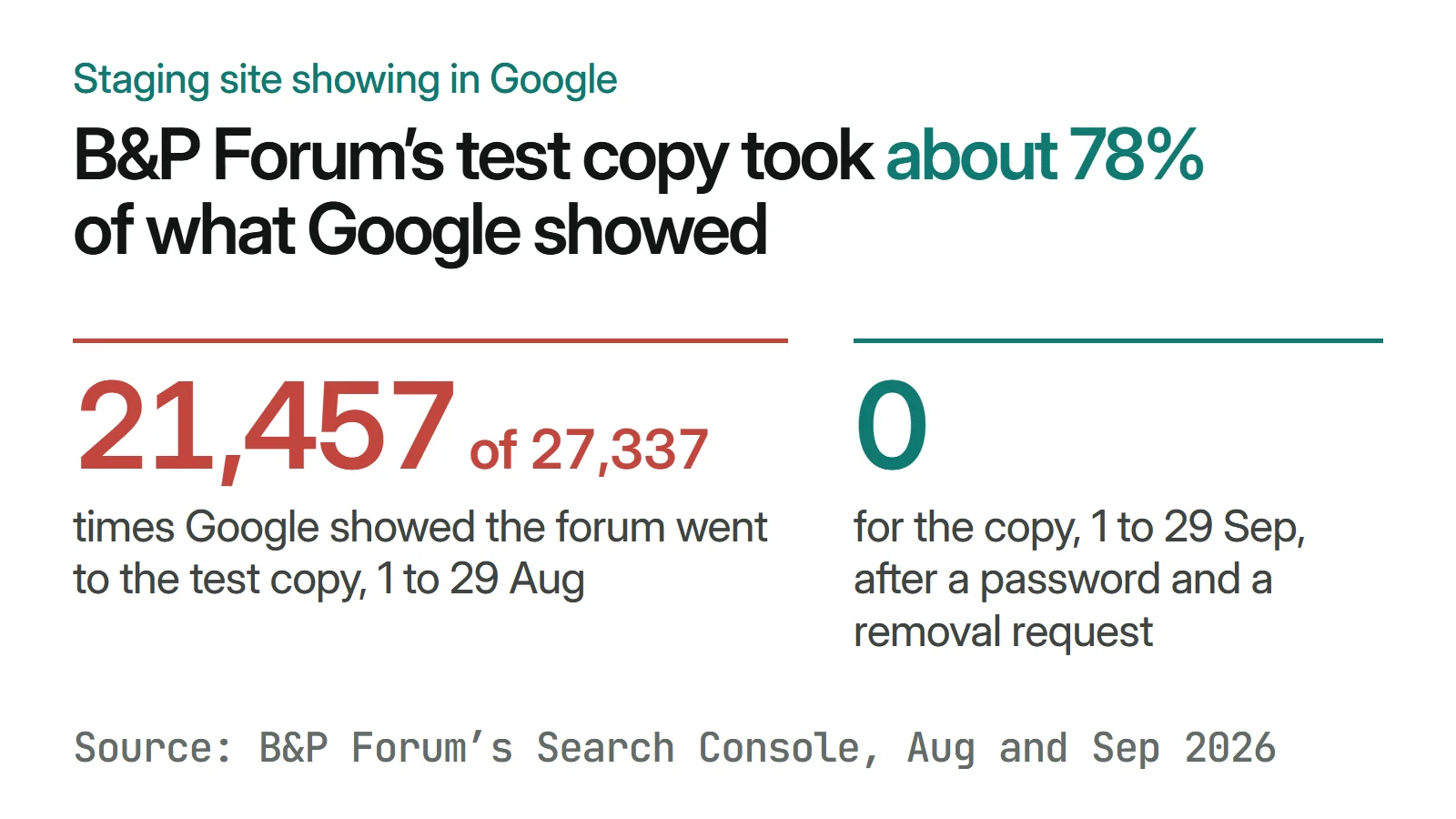
A staging site showing in Google comes out with a password on the copy and a Removals request for its whole address. B&P Forum's test copy took 21,457 impressions in August 2026 and had none in September.
In short
- Lock the staging copy with a password, or a noindex tag on every page, then ask Google to hide its whole address with the Removals tool. A removal lasts about six months, so the lock has to stay.
- Google says robots.txt "is not a mechanism for keeping a web page out of Google": a blocked address can still appear in results, without a description.
- B&P Forum's test copy, staging.bpforum.org, took 21,457 of the site's 27,337 Google impressions from 1 to 29 August 2026 and got 10 clicks. Its last impressions were on 31 August.
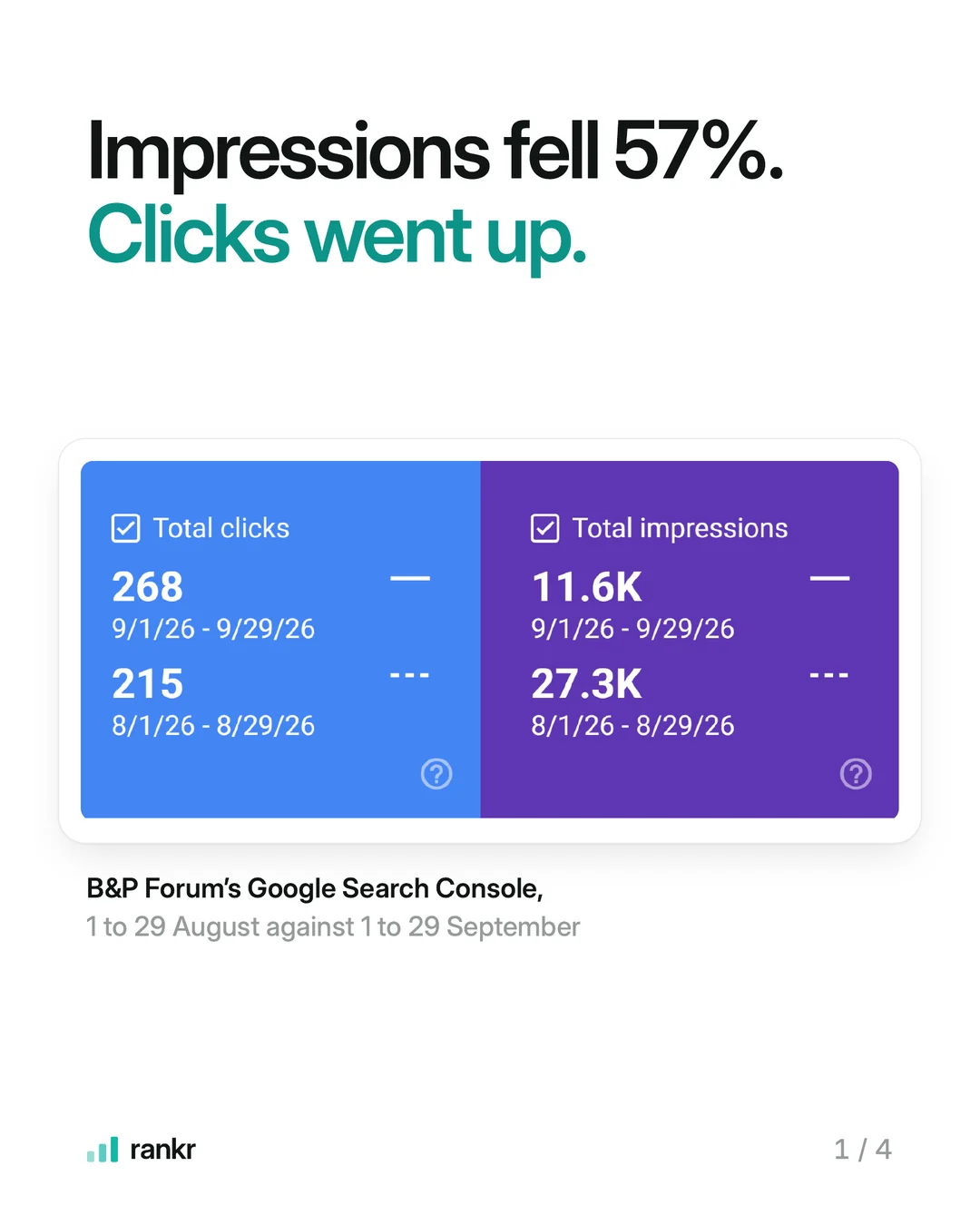
- Over the same days in September, impressions fell from 27.3k to 11.6k and clicks rose from 215 to 268.
A staging site showing in Google is a test copy of your website that Google found and listed, and it comes out in two moves: put the copy behind a password, then ask Google to hide every address on it with the Removals tool in Search Console. A robots.txt block on its own will not take it out of Google.
At rankr, a Singapore SEO agency, we found one on B&P Forum's site in August 2026. Its test copy, staging.bpforum.org, took 21,457 of the 27,337 times Google showed the forum from 1 to 29 August, about 78%, and got 10 clicks. We put it behind a password and asked Google to remove it. Its last impressions were on 31 August.
How do you check for a staging site showing in Google?
Web developers build changes on a copy of the site before they go live. The copy usually sits on an address starting with staging or dev, or on the hosting company's own domain, such as yoursite.vercel.app, yoursite.wpengine.com or yoursite.netlify.app. Four checks find it:
- Search your business name in a private window, so you are logged out of Google, and read the address under every result on the first two pages.
- Search
site:yourdomain.com. Google lists the pages it has saved under your domain, subdomains included, so a copy at staging.yourdomain.com shows up here.site:staging.yourdomain.comnarrows the list to the copy. - Search your name on the host's domain, for example
"Your Business Name" site:vercel.app, then the same with wpengine.com and netlify.app. A copy on the host's address never appears under your own domain. - Filter Search Console by page. Open Performance, then Search results, click Add filter, choose Page and enter
staging.under URLs containing. This works in a Domain property, which Google says "Includes all subdomains". A property set up for www.yourdomain.com alone will not show the copy.
Test-copy finder
- Every subdomain Google holds except www
site:yourbusiness.com -site:www.yourbusiness.com - A staging subdomain
site:staging.yourbusiness.com - A dev subdomain
site:dev.yourbusiness.com - A copy on Vercel
"Your Business" site:vercel.app - A copy on Netlify
"Your Business" site:netlify.app - A copy on WP Engine
"Your Business" site:wpengine.com - A copy on Shopify's own address
"Your Business" site:myshopify.com
Open each search in a private window. Any result that is not your real website, such as an address starting with staging or dev, or ending in .vercel.app, is a test copy Google can show instead of you.
If your business also struggles to show up for its own name, a test copy is one of five things to check.
Why does a staging site show up in Google?
Google finds new pages by following links from pages it already knows and by reading sitemaps, according to its guide to how Search works. A staging copy gets found the same way, for example through a link to it left on the live site or an address shared somewhere public. Unless something on the copy tells Google to stay out, Google can crawl and list it like any other site.
Google's canonicalization guide names this case among the usual sources of duplicate pages: "the demo version of the site is accidentally left accessible to crawlers". When two addresses carry the same content, Google shows the one it judges "the most complete and useful for search users", and that will not always be your real site. Our free AI visibility checker flags a test copy linked from your homepage.
How do you remove a staging site from Google?
- Lock the copy. Ask your developer or host to put the whole staging address behind a password, so every page asks for a login before it loads. Google's robots.txt guide says: "To keep a web page out of Google, block indexing with noindex or password-protect the page." If a password is not possible, add
<meta name="robots" content="noindex">to every page or send theX-Robots-Tag: noindexheader, and make sure the tag does not travel to the live site when the copy is published. Google's removals guide calls noindex "less secure than the other methods". - Own the staging address in Search Console. The Removals tool works only for a URL "on a Search Console property that you own". A Domain property, verified with a DNS record, already covers staging.yourdomain.com. For a copy on the host's domain, add a URL-prefix property for that exact address and verify it before you lock the copy, since Google has to read the verification tag.
- Request removal of the whole address. In Search Console, open Removals under Indexing, select the Temporary Removals tab and click New Request. Choose "Remove all URLs with this prefix" and enter
https://staging.yourdomain.com/. Google's own example shows your real site stays in: "Blocking https://staging.domain will not block www.domain or https://domain.com". It says a request "usually takes up to a day to process". - Keep the lock on. "A successful request lasts only about six months", and after that anything Google can still open can come back. Google lists a password as a permanent way to remove a page, so leave it in place for as long as the copy exists, or delete the copy so its addresses return 404 or 410.
- Check the result. Run the Search Console page filter from the checks above each week until the copy's impressions reach zero.
B&P Forum's copy had 21,457 impressions from 1 to 29 August 2026 and none from 1 to 29 September. When we checked on 6 November 2026, every page on it still asked for a login.
Why doesn't robots.txt remove a staging site from Google?
robots.txt controls crawling, and a listing can outlive the crawl. Google's robots.txt guide says the file "is not a mechanism for keeping a web page out of Google", and that a blocked page's "URL can still appear in search results, but the search result won't have a description". A block also hides a noindex tag from Google: "For the noindex rule to be effective, the page or resource must not be blocked by a robots.txt file". The removals guide puts it in one line: "Do not use robots.txt as a blocking mechanism."
| Method | What Google does | Takes the copy out of Google? |
|---|---|---|
| Password on the whole copy | Gets a login prompt on every page | Yes. Google lists it as a permanent removal |
noindex on every page | Reads the tag and drops each page | Yes, if robots.txt lets Google read the pages |
robots.txt Disallow: / | Stops crawling, and can keep the addresses listed | No |
| Removals tool, prefix request | Hides every address under the prefix | For about six months |
Our guide to unwanted pages in Google applies the same rules to other pages you never meant to be listed.
What happened after B&P Forum's test copy came out?
From 1 to 29 August 2026, Google showed bpforum.org 27,337 times and sent 215 clicks. Over the same days in September, with the copy gone, it showed the site 11,639 times and sent 268 clicks: impressions down 57%, clicks up. The copy's impressions had almost never turned into visits, and why impressions drop while clicks hold explains how that moves every number in the report.
The forum's own name moved too. Searches for "business and philanthropy forum" averaged position 16.4 in August and 1 in September. Between those two months the copy came out and we rewrote 83 page titles, among them a homepage title that said "Home", so the result belongs to both changes.
Over two full months, Google clicks went from 227 between 1 and 30 August 2026 to 501 between 1 and 30 October, with 16 new articles and 3 speaker pages adding to them. The B&P Forum case study has every Search Console screen. Finding and removing copies like this one is part of our technical SEO work.
Sources
- Google Search Central: Robots.txt introduction and guide, last updated 10 December 2025, read 6 November 2026
- Google Search Central: Block search indexing with noindex, last updated 10 December 2025, read 6 November 2026
- Search Console Help: Removals and SafeSearch reports tool, read 6 November 2026
- Search Console Help: Add a website or platform property, read 6 November 2026
- Google Search Central: What is URL canonicalization, last updated 20 August 2026, read 6 November 2026
- Google Search Central: In-depth guide to how Google Search works, last updated 18 December 2025, read 6 November 2026
Frequently asked questions
How do I block Google from accessing a staging website?
Put a password on the whole staging address. Google's robots.txt guide names a password and noindex as the two ways to keep a page out of Google, and a password keeps people out as well. A robots.txt Disallow stops crawling, but Google can still list the addresses.
What should I do if my development site is indexed by Google?
Lock it with a password, make sure you own its address in Search Console, and file a Removals request with "Remove all URLs with this prefix". Keep the password on afterwards, because a removal lasts about six months.
Why is my staging subdomain showing up in Google instead of my real site?
Google found the copy, saw the same content on two addresses and picked one to show. Its canonicalization guide says it chooses the version it judges "the most complete and useful for search users", which is not always yours. Once the copy is locked and removed, your real site is the only version left.
Want this done on your site? Send us your website and we will tell you what we would fix first. The audit is free.