How to exclude branded queries in Search Console
Search Console has had a built-in Non-branded queries filter since November 2025, for sites that qualify. Here is how to use it, the regex that works everywhere else, and why the number it leaves runs low.
In short
- Search Console's Non-branded queries filter sits under Add filter, then Query. Google announced it on 20 November 2025 and made it available to all eligible sites on 11 March 2026.
- It works only on top-level properties with enough queries and impressions. Anywhere else, use Custom (regex) with your name's variants and Doesn't match regex.
- Clicks from searches for your own name come from people who already know you, so the number to ask an agency for is non-branded clicks.
- Search Console drops rare searches from the totals once you filter by query, so the real non-branded number is likely higher than the filter shows.
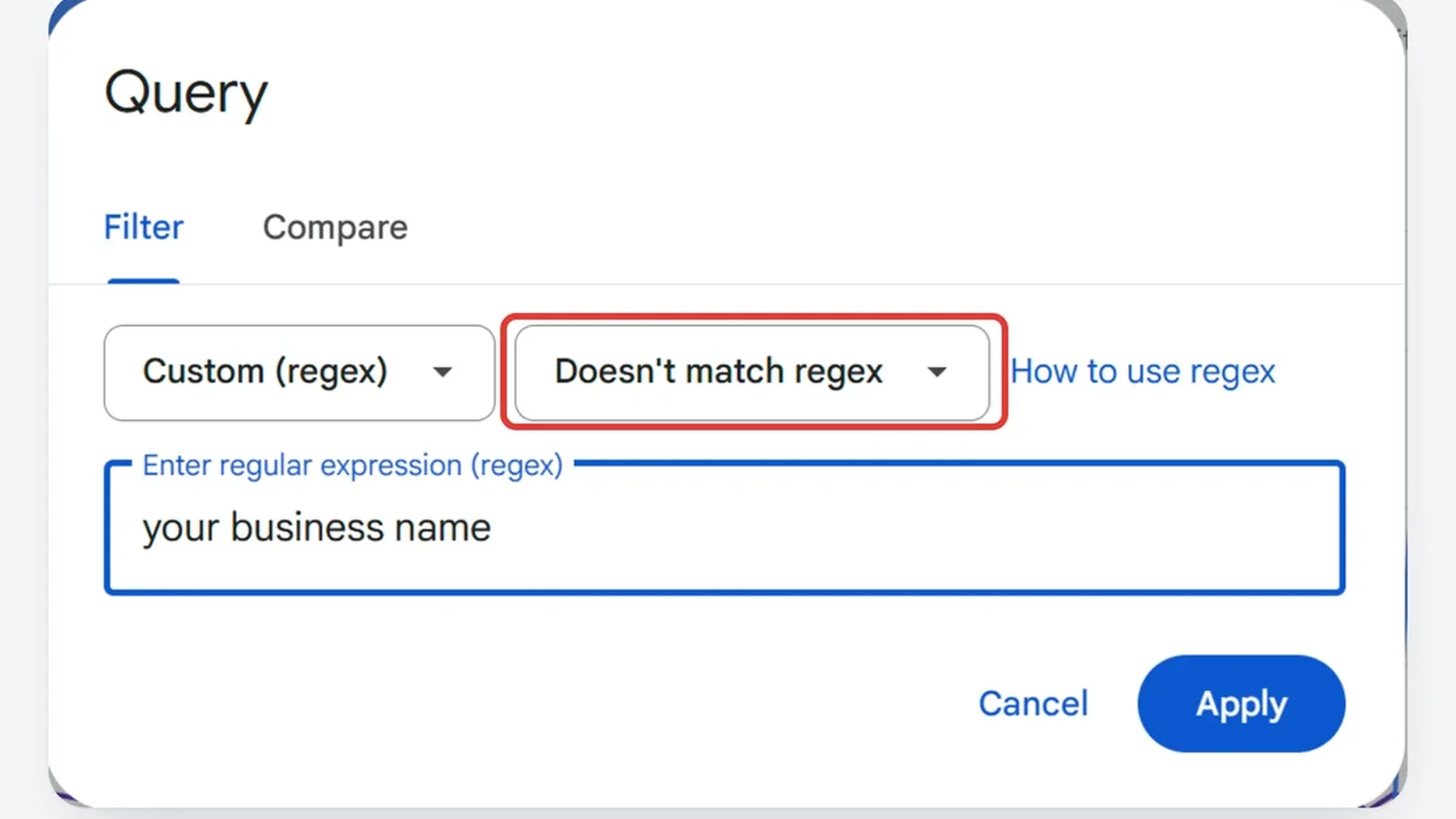
To exclude branded queries in Search Console, open Performance, then Search results, click Add filter, choose Query and select Non-branded queries, a built-in filter Google announced on 20 November 2025. If your property does not offer it, choose Custom (regex) instead, type your business name and its misspellings separated by |, and switch Matches regex to Doesn't match regex. What is left is every search from someone who found you without typing your name.
Does Search Console have a branded queries filter?
Yes. Google announced it on its Search Central blog on 20 November 2025, in a post by Michael Huzman, a software engineer on Search Console, and added an update on 11 March 2026: "The branded queries filter is now available to all eligible sites." It splits the Search results Performance report into two views. Branded shows "queries that include your brand name or closely associated products", and Non-branded shows "all other queries".
It works for web, image, video and news search, and shows clicks, impressions, CTR and average position for the group you pick. The Insights report has a matching card, Branded traffic, which shows the share of clicks from each group.
Google decides what counts as branded. Its post says the split is "NOT based on a regular expression" but on "an internal, AI-assisted system" that includes your brand name "in all languages, typos, and also queries that don't include the brand name but refer to a unique product or service of the site." It also says "some queries may occasionally be misidentified".
How do you exclude branded queries with the built-in filter?
- In Search Console, choose Performance, then Search results.
- Click + Add filter and choose Query.
- Select Non-branded queries and click Apply.
- Set the date range. If most of your customers are in Singapore, add a Country filter for Singapore too.
- Check the split. Switch the filter to Branded queries and read the list in the Queries tab, since Google says some searches land in the wrong group.
For a quick read without the report, open Insights and find the Branded traffic card.
Why can't I see the branded queries filter in Search Console?
Google's announcement gives two reasons. The filter is "only available for top level properties", so a property for a folder such as https://example.com/path or a subdomain such as developers.google.com (Google's own examples) does not get it. It is also "only available for sites with a sufficient volume of queries and impressions". Search Console's Insights help says the same: it "isn't available for sub-properties (for example, https://example.com/blog/) or for sites with a low number of impressions."
If your property covers only a folder or a subdomain, add a Domain property for the whole domain. If the site is too small, use the regex below. It does the same job, and you decide what counts as your name.
How do you exclude branded queries in Search Console with regex?
- In Performance, then Search results, click + Add filter and choose Query. If your property shows the branded options, select By keyword first.
- Open the first dropdown and choose Custom (regex).
- Type your name and its variants, separated by
|. - Switch Matches regex to Doesn't match regex.
- Click Apply.
Search Console uses RE2 syntax, ignores capital letters unless you tell it otherwise, and matches a pattern anywhere inside a search unless you add ^ or $, according to its filtering help. Start from this template and replace each part:
yourname|your name|yourname\.com|yourname\.sg|yuorname|productname
- the name typed joined and with a space;
- your domain, with a backslash before each dot, because a plain dot matches any character;
- the misspellings customers make, such as a dropped or swapped letter;
- the names of products or services only you sell, since Google's built-in filter counts those as branded too;
- the name in Chinese or Malay, if customers search for you that way.
Google's own example, from its 2 June 2021 post that added the "doesn't match" option, is for a company called Willow Tree: willow tree|wilow tree|willowtree|willowtee. A ? makes the character before it optional, so willow ?tree covers both "willow tree" and "willowtree" in one entry.
Then check it. Switch back to Matches regex and read the list: every row should be a search for you. If your name is also an everyday word, searches for that word get removed too, so add the word that follows your name, such as your trade, or list your exact name searches instead.
Search Console filter builder
.*(lullaflex|lulla ?flex).*In Search Console: Performance > Search results > + Add filter > Query > Custom (regex), choose Doesn't match regex, paste, Apply. Leaves the searches from people who did not type your business name: the clicks SEO actually earned.
- Filtered out lullaflex mattress
- Kept best cooling mattress singapore
- Kept super single bed size in cm
- Kept how big is a queen bed
Why exclude branded queries from an SEO report?
A report that counts your name searches counts clicks you would get anyway. Anyone who types your business name already knows you, and would have found you with or without an agency. Google puts the difference this way: branded queries "typically lead to higher-ranking pages from your site and result in higher click-through rates, whereas non-branded queries offer organic growth, as they show how new users find your content without any initial intent to go to your site."
So the number to ask an agency for is non-branded clicks: this month against the month before the work began, with the same filters and the same country. Total clicks can also rise because more people heard your name from an ad, a referral or a busy season. Our guide to what an SEO report should show lists the rest of what to ask for, and the measure and improve chapter of our free course covers comparing two periods fairly.
For how non-branded searches build up on a new site, month by month, see how long SEO results take in Singapore. Our case studies show what the work looked like on two Singapore sites.
Why is the non-branded number lower than the real one?
Search Console hides rare searches, and it drops them from the totals as soon as you filter by query. Google's 19 October 2022 deep dive calls them anonymized queries: searches "that aren't issued by more than a few dozen users over a two-to-three month period." They never appear as rows, but "they are included in chart totals, unless you filter by query." Search Console's help adds that the "match" and "does not match" totals "may not add up to the unfiltered total".
Google's example is a site with 550 clicks in total, 450 of them from searches the report lists. Filter for queries containing "fiction" and the report shows 175 clicks. Filter them out and it shows 275. The two add up to 450, and the 100 clicks from hidden searches are in neither.
So the figure left after Doesn't match regex runs low. For a fuller one, take the total with no query filter and subtract the clicks your Matches regex filter shows: what remains includes the hidden searches. A few of those may contain your name, so read the filtered figure as the floor and the subtracted one as the ceiling. Google does not say whether its built-in filter counts hidden searches. Our guide to the keywords Search Console shows for each page explains why the rows never add up to the total.
If you would rather have someone set this up and read it with you, book a free SEO audit.
Sources
- Google Search Central: Introducing the branded queries filter in Search Console, 20 November 2025, updated 11 March 2026
- Search Console Help: Insights report, read 6 November 2026
- Search Console Help: Performance report (Search results), advanced filtering and comparison, read 6 November 2026
- Search Console Help: Performance report (Search results), troubleshooting data discrepancies, read 6 November 2026
- Google Search Central: A deep dive into Search Console performance data filtering and limits, 19 October 2022
- Google Search Central: Search Console regex filters update and quick tips, 2 June 2021
Frequently asked questions
What is a branded query?
A search that includes your business name, a misspelling of it, or a product only you sell. Google's examples for its own site: "Google", the misspelling "Gogle" and the product "Gmail" are all branded queries.
What are non-branded keywords?
Searches for what you sell or the problem you solve that do not name your business, such as a service and an area. Google says they "show how new users find your content without any initial intent to go to your site."
Does excluding branded queries affect my Google rankings?
No. A filter changes only what the report shows. Google says the branded queries filter "has no effect on how Google Search ranking works."
Want this done on your site? Send us your website and we will tell you what we would fix first. The audit is free.